Printout Samples
Here we will see a few printout samples of the Purchase Order Suggestion list. This list shows information about each supplier, with their Supplier code and Supplier name. The number of suppliers is shown in a column. For each part number, each suggestion is shown on a separate row, see the section Explanation of the Columns in the List.
In the Info menu using the right mouse button, you will find additional functions for the list.

Sample of the left portion of the Purchase Order Suggestion list, one order per supplier.

Sample of the right portion of the Purchase Order Suggestion list, one order per supplier.
Below you will see a sample of a distributed purchase between two suppliers where the distribution is 70/30 in percent. Please note that only the current supplier will be shown in the purchase order suggestion. In the Info menu you can choose to see the distributed purchase. When the purchase order suggestion is released, purchase orders are generated to the suppliers included in the distribution.
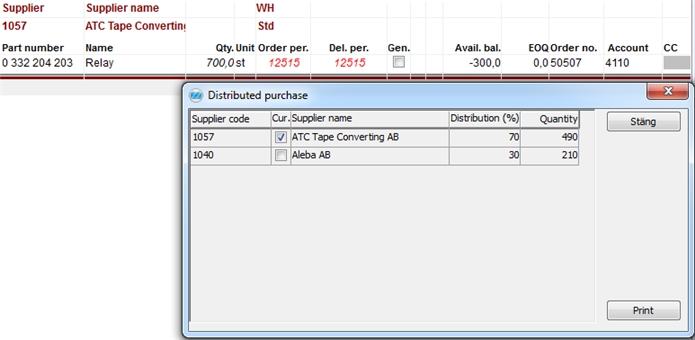
Sample of the Purchase Order Suggestion list with the alternative Distributed purchase.
Below you will find an example where several blanket orders are linked to the part and supplier. The order row where the blanket order number has the highest priority will be shown. If several blanket orders have the same priority, the one with the lowest number will be shown. A red exclamation mark is shown next to the Blanket order if there are overlapping blanket orders. If you place your cursor over the exclamation mark, you will see information about the blanket order in question. The following information will be shown: Order number, Valid from, Valid thru, Priority, Called quantity, and Rest quantity.

Sample of the left portion of the Purchase order suggestion list, with several blanket orders.

Sample of the right portion of the Purchase order suggestion list, with several blanket orders.