Summary and Tips for WIP List and Inventory Values
When Manufacturing to Finished Stock:
In the first example, a more repetitive manufacturing against the finished stock is used. There are purchased parts (P) that are incorporated as material in manufactured parts (M), or stocked parts (S). For the purchased parts work or subcontracting work is added/put in. They are processed into manufactured parts, alternatively stocked parts if the parts will be in the buffer stock (for example as semi-finished products). This can be done at several levels, and is determined during preparation.
In those occasions, while the parts are under manufacturing (with reported operations), they cannot be valued while calculating the inventory value, since they then have been withdrawn from the stock. Instead, the M-parts and S-parts are in the WIP List. Once the last operation has been reported for parts (when the parts have been reported as finished), they will be sent to the semi-finished product stock or finished stock, depending on whether they are S-parts or M-parts. Then you can value the parts as inventory value again.
In order to value M-parts and S-parts that are in WIP, you must select the Started, not finished option in the Create tab. The WIP List will value the parts to Net WIP, which is the Gross WIP minus WIP to stock. This way of calculating the value is the most common one.
- The inventory value of P-parts, M-parts and S-parts must be based on the standard price.
- The WIP List for M-parts and S-parts must be based on standard price, using the Started, not finished setting. WIP List will calculate the value to Net WIP.
- This way of calculating the value is the most common one.
- The inventory value calculation for P-parts, M-parts and S-parts can also be rolled into one single calculation.
- To obtain a limited list for your voucher files, use a Minimum value when calculating the inventory value, so that only the 30 most valuable stock parts will be shown in detail, and the remaining parts will be shown as a total under Total small items.
- It is appropriate to use the Order list type in WIP List, to create a short list for your voucher files.
- You can check how realistic the WIP value is by creating the WIP value using Reported quantity. This way, the WIP value will be calculated regardless of reported time.
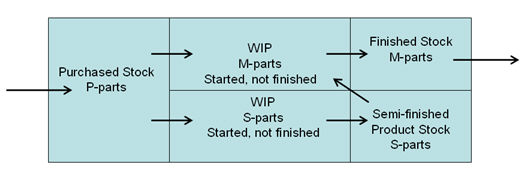
WIP when manufacturing to finished stock.
When Manufacturing to Customer Orders:
The second example refers to customer order oriented manufacturing (when not using finished stock). This form of evaluation is mainly used by companies that manufacture directly against their incoming customer orders. This particularly applies to companies with few orders that are more like projects with long-term manufacturing. In this case, each M-part at the top level is linked to a customer order.
The difference here from the previous example, is that an M-part reported as finished in a manufacturing order is never transferred to the finished stock, but is instead sent directly from the WIP value to an income, as soon as the customer order is delivered and invoiced. The S-parts that are reported as finished are treated the same as in the previous example: they go from the WIP value to an inventory value in a semi-finished product stock.
In order to value M-parts that are in WIP, you must select the Started, not delivered option in the Create tab. The WIP List will value the M-parts to Gross WIP, which is the Net WIP plus WIP to stock.
To value the S-parts that are WIP, you should select Started, not finished instead. The S-parts are valued like in the previous example to Net WIP.
- The inventory value of P-parts and S-parts must be based on the standard price.
- The WIP List for S-parts must be based on standard price, using the Started, not finished setting. WIP List will calculate the value to Net WIP.
- The WIP List for M-parts must be based on standard price, using the Started, not finished setting. WIP List will calculate the value to Gross WIP.
- This form of evaluation is mainly used by companies that manufacture directly against their incoming customer orders. This particularly applies to companies with few orders that are more like projects with long-term manufacturing.
- The inventory value calculation for P-parts and S-parts can also be rolled into one single calculation. Please Note! No inventory value will be calculated for M-parts, since they are included in the WIP List.
- To obtain a limited list for your voucher files, use a Minimum value when calculating the inventory value, so that only the 30 most valuable stock parts will be shown in detail, and the remaining parts will be shown as a total under Total small items.
- It is best to use the Order list type (or classify the list by project, see below) in the WIP List, to create a short list for your voucher files. Please Note! The S-parts and M-parts have different Order status.
- You can use the WIP List to check how realistic your WIP values are. You can do this by setting the Project = Customer order number for all the manufacturing orders that apply to the same customer order. Then you can classify the WIP List by Project, which will give you a basis that can be compared to the customer order backlog.
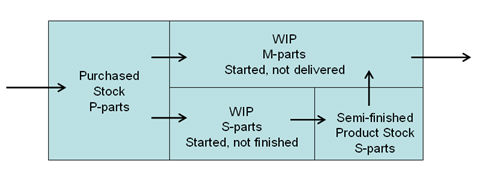
WIP when manufacturing to customer orders.
Calculation Differences and WIP Values
A manufactured part in an order is entered in the stock balance as soon as the last operation is reported. Depending on whether the reported time differs from planned time, some calculation differences may occur during post-calculation. It is then important that the value of these differences is interpreted in the right way in the list that the WIP List creates. This calculation difference in WIP can be described according to the following:
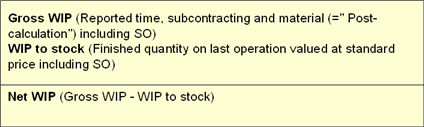
Calculation difference in WIP.
Gross WIP is valued as the actual reported cost from post-calculation, the SO is the storage overhead mark-up. WIP to stock is valued as the reported quantity multiplied by the standard price from the pre-calculation. Net WIP is valued as Gross WIP minus WIP to stock.
That means that an order that turned out “better” than what the pre-calculation showed (i.e. that the reported cost is lower than the pre-calculated cost), can give a lower Gross WIP than the corresponding inventory value in WIP to stock when the order is reported as finished. The opposite can apply if an order that turned out “worse” than shown in the pre-calculation, and thereby give a larger Gross WIP than the WIP to stock when the order is reported as finished. This means that orders that deviate from the pre-calculation will make the Net WIP show either a positive or a negative value. If the order is reported as finished, then the Net WIP will equal the calculation difference for the order.
The conclusion of this reasoning is that a negative Net WIP is better that a positive one, since it shows orders that have turned out better than what was indicated in the pre-calculation.
Saving WIP Values for Statements
You can save a copy of a database backup, which can be used at the end of the month to see the WIP values for the monthly statement.
This is done by using the MONITOR Backup program to create a copying task, that in the last day of every month will copy the database to a test company for monthly statement. The next WIP calculation in that test company will then display an instantaneous value of the WIP in the last day of the previous month.
Read more about copying the database in the MONITOR Backup section in the MONITOR Basics - Configuration and Maintenance - Security.