Settings in the Register Basic Data - Project
In the Register Basic Data - Project procedure you should configure the following settings:
The Project Types Tab
In the column Revenue calculation method you select Percentage-of-completion method for the project type.
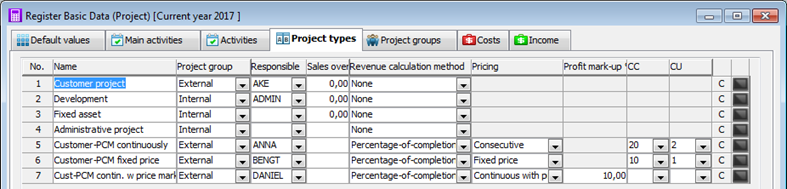
The Project types tab in the Register Basic Data - Project procedure.
- Revenue calculation method - Here you will find two available alternatives: None and Percentage-of-completion method.
- Pricing - Here you select one of the following alternatives Consecutive, Fixed price, or Continuous with profit mark-up.
- Consecutive - the calculation is based on the (stage of completion * forecasted income) - the actual income.
- Fixed price - the calculation is based on the (stage of completion * forecasted income) - the actual income. The calculated recognized income will not exceed the forecasted income.
- Continuous with profit mark-up - the calculation is based on the actual costs increased with the entered profit mark-up. - Profit mark-up % - if you have selected the pricing Continuous with profit mark-up, then the Profit mark-up column will be activated. Here you enter a default value for the profit mark-up, but this can be changed. However, you must enter a value in order to save the project type.
- CC - here you select cost center for the recognized income for the project type.
- CU - here you select cost unit for the recognized income for the project type.
 Save default values for the current project type regarding activities, costs, and income. This is made under the Default values tab.
The Income Tab
Under the Income tab you register the income type you are going to use during revenue calculation. You enter this income type on income accounts in the Chart of Accounts procedure, please see Settings in the Chart of Accounts / Standard Accounts procedure. It is important that you check the box called Hide in expected result for the income type used during revenue calculation. Otherwise, a too high income might be reported in the Expected result.
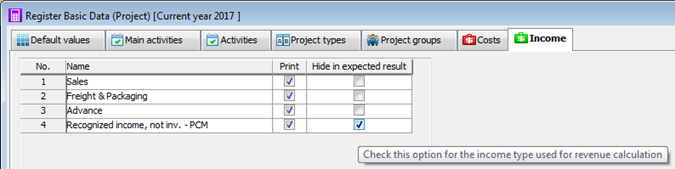
The Income tab in the Register Basic Data - Project procedure.