The Register Project Procedure when Using Percentage-of-Completion Method
When you have configured settings regarding percentage-of-completion method, then additional fields will be added to the Register Project procedures for projects using the percentage-of-completion method.
The General Tab
Under the General tab you will find the heading Revenue calculation method. Here you will see information about the selected method as well as pricing for the project type. In the Calculation basis stage of completion field you select if the calculation should be based on costs or hours. Costs are selected by default.
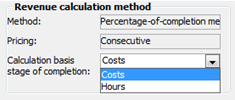
The section Revenue calculation method.
The selection made here is the basis for the actual revenue calculation made in the Revenue Calculation procedure as well as for the stage of completion shown in the project header in the Register Project procedure.

The stage of completion in percent.
The stage of completion is shown in the project header according to the calculation basis selected for the project. The stage of completion is only shown in the interval 1 - 100%. If the calculation exceeds 100% or falls below 0%, this will be highlighted in red. If you place the cursor over the percentage, you will see actual calculation in a so-called tooltip.

Example where the stage of completion exceeds 100%.
The Result Tab
Under the Result tab, the stage of completion is calculated based on actual costs in relation to forecasted costs. This will then be shown in the Stage of completion field.
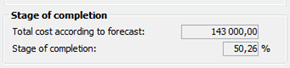
The stage of completion under the Result tab.
The Time Check Tab
Under the Time check tab you will find columns for forecasted and planned hours. The stage of completion is calculated based on the actual hours in relation to the forecasted hours.
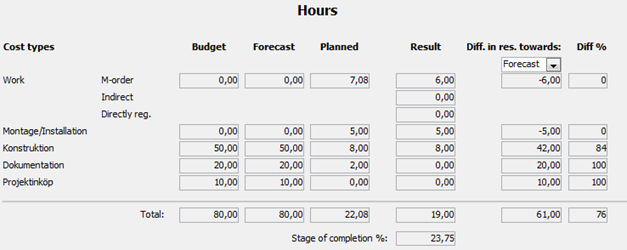
The Time check tab.